Icons and tooltips
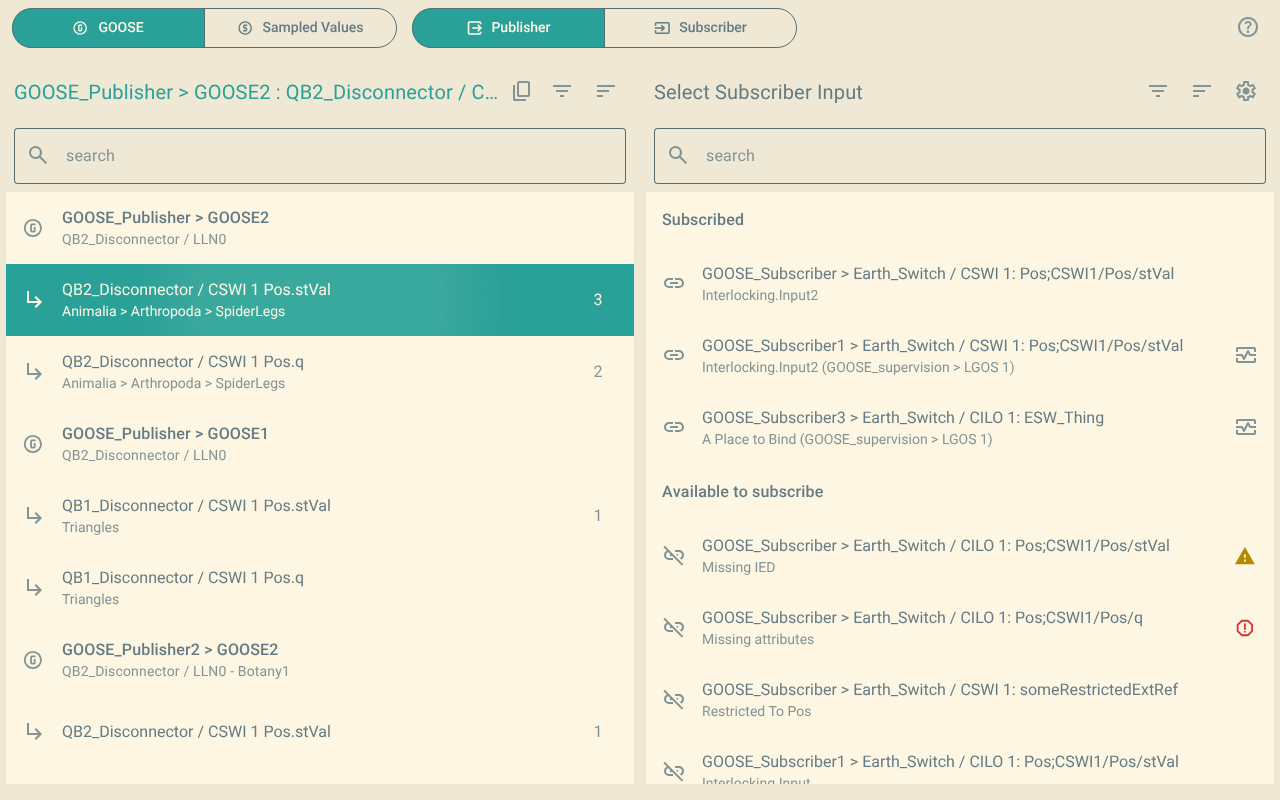
1. Icons in the lists
| Icon | Meaning |
|---|---|
Chain ( |
The input is subscribed. |
Broken chain ( |
The input is not subscribed. |
Heart monitor ( |
A supervision logical node supervises the subscription. The tooltip of the input shows the supervision. |
Yellow triangle ( |
The input is subscribed, but the file does not have the published data. Check that the IED, the control block and the data set are correct. |
Red circle with an exclamation mark ( |
The subscription of the input is not complete. Some of its attributes are missing. The plugin shows this as Invalid Mapping. |
Padlock ( |
The read-only view is on. For more information, refer to Read-only view. |
2. Why a subscription is missing or not valid
A file can have missing or incomplete subscriptions for these reasons:
-
The file is not the full substation configuration, for example an ICD or a CID file. Then the file does not have the publishing IED.
-
Some manufacturers use the
ExtRefelement for their own data. For example, SEL uses it for its message quality mapping.
3. Tooltips
Hold the pointer on an item to see its tooltip.
- Published data
-
The common data class (CDC) and the basic type of the data, for example
CDC: DPCandBasic Type: Dbpos. - Inputs
-
These items, when they apply:
-
The preconfigured attributes of the input (
pServT,pLN,pDOandpDA). -
The CDC and the basic type of the preconfigured attributes.
-
The supervision of the subscription.
-
Why the subscription is missing or not valid.
-
The plugin can show the CDC and the basic type of an input only when the input has preconfigured attributes.
When the plugin cannot find the data type of the preconfigured attributes, the tooltip tells you. Then you cannot subscribe the input.