Read the table of control blocks
The table of control blocks shows what a version of an application configures. The plugin shows the table in these places:
-
In the Apply tab, when you click Show mappings, and after you apply.
-
In the Manage tab, in the Control blocks card of a version.
-
In the last step of the capture, Review and save.
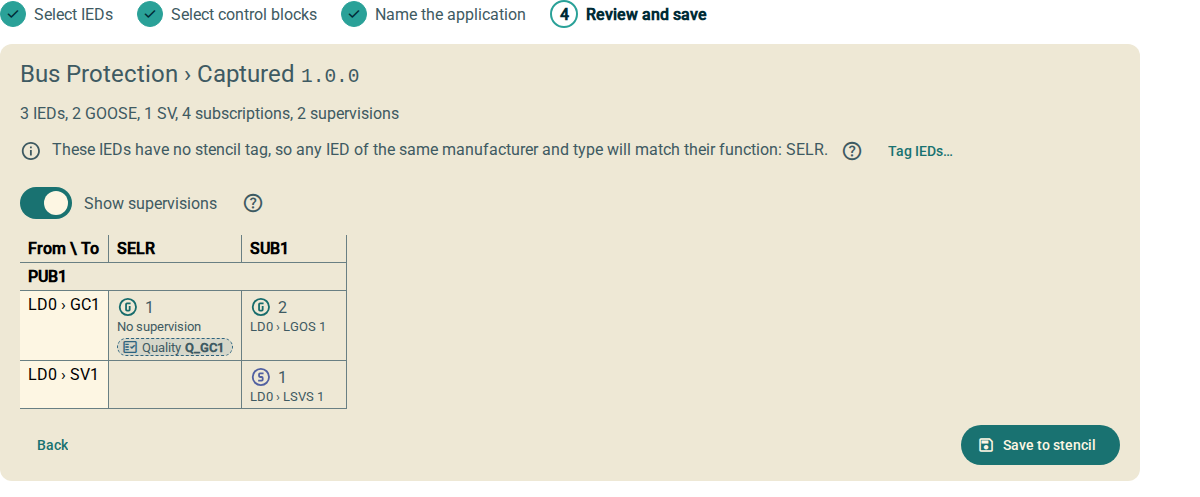
1. Rows and columns
-
Each column is a function that subscribes.
-
Each group of rows is a function that publishes. The group header shows the function name.
-
Each row is a control block of the publishing function, for example
LD0 › GC1.
After you apply, the header of each column and group also shows the name of the IED.
When the table is wider than the card, scroll to the right. The names of the functions and the control blocks stay visible.
2. Cells
A cell shows that a subscribing function receives data from the control block of the row. An empty cell shows that it receives no data from this control block.
Each cell contains:
-
An icon with the letter G for GOOSE or S for sampled values.
-
The number of signals that the subscriber receives.
-
The supervision logical node that monitors the subscription, for example
LD0 › LGOS 1. No supervision shows that the subscription has no supervision. -
For SEL relays, a Quality badge with a dashed border. The badge shows the message quality input.
To hide the supervisions, clear Show supervisions. The Quality badges stay visible.